


MultiMM is an OpenMM-based tool for building 3D models of chromatin, from single genomic regions to the whole human genome. It is multiscale: one energy function covers nucleosomes, loops and TADs, A/B compartments, chromosome territories and the nucleus. You give it loop calls, and optionally compartments or a Hi-C map, and it returns a 3D structure that you can open in any molecular viewer. The model is fast because it starts from a compact Hilbert-curve conformation and runs on GPUs through OpenMM.
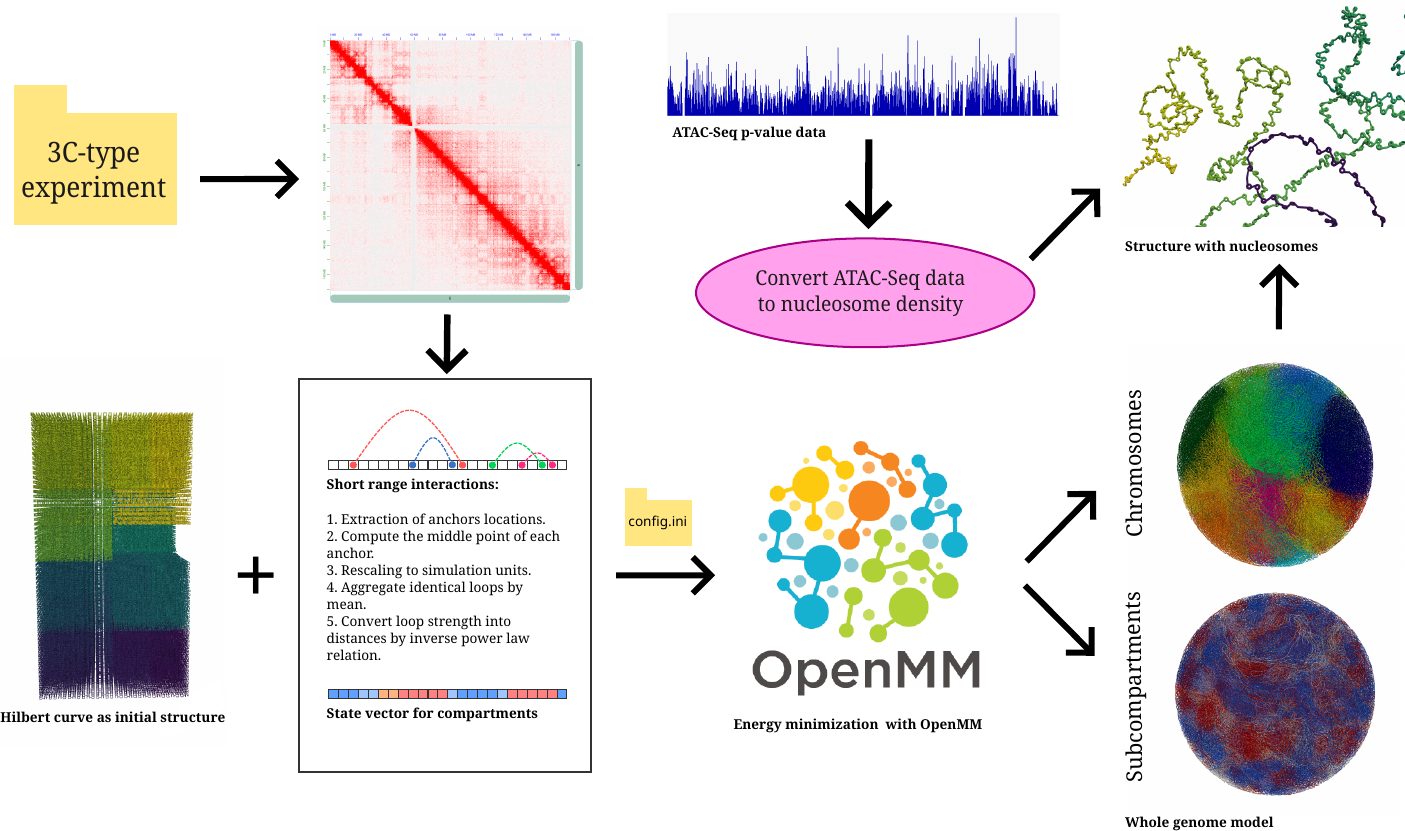
One energy function ties together five scales. Each is a different way of looking at the same chain of beads.
| Scale | What it means | How MultiMM models it |
|---|---|---|
| Nucleosome / fibre | DNA wrapped around histones, forming a ~10 nm fibre | Beads joined by bonds and angle (stiffness) terms, with excluded volume so beads do not overlap |
| Loops | Pairs of distant sites held together, e.g. by CTCF and cohesin | Harmonic springs between loop anchors, taken from your loop file |
| TADs / Hi-C contacts | Domains that fold together more than with their surroundings | Optional restraints derived from a Hi-C map by Boltzmann inversion |
| A/B compartments | Active (A) and inactive (B) chromatin that cluster by type | Soft attraction between beads of the same compartment type |
| Chromosomes and nucleus | Chromosome territories inside a nucleus, anchored at the lamina | Container wall, lamina and chromosome-block forces |
From PyPI:
pip install MultiMMWith uv (fast, isolated):
uv pip install MultiMM          # into the current environment
uv tool install MultiMM         # or as a standalone command-line tool
For .hic Hi-C files, also install the optional reader (pip install "MultiMM[hic]"); .cool and .mcool files work out of the box.
Requires Python 3.10 or newer. Linux is the main platform; macOS works without CUDA. The documentation covers installation from source.
All settings live in one config file:
MultiMM -c config.iniAny setting can also be overridden on the command line, for example --n_beads 2000.
You only write what you want to change; everything else has a default.
[Main]
CHROM            = chr1
LOC_START        = 160_000_000
LOC_END          = 173_000_000
N_BEADS          = 5000

LOOPS_PATH       = data/loops.bedpe          ; chromatin loops
COMPARTMENT_PATH = data/compartments.bed     ; optional A/B compartments
COB_USE_COMPARTMENT_BLOCKS = True

OUT_PATH = results/chr1_regionThe full documentation, with the mathematics of every force and a table of all arguments, is written with MkDocs and its source is in docs/. To read it locally:
pip install mkdocs-material
mkdocs servegit clone https://github.com/SFGLab/MultiMM.git
cd MultiMM
uv sync --extra dev # or: pip install -e ".[dev]"Run the tests (all are quick checks, no full simulation, about half a minute):
uv run pytest -q                # or: pytest -q
uv run pytest tests/test_force_signs.py   # a single file
Console output has four levels: no flag shows only the pipeline stages and progress bars; -v adds details, -vv adds statistics tables, -vvv is fully verbose.
If you use MultiMM in your research, please cite:
Korsak, Sevastianos, Krzysztof Banecki, and Dariusz Plewczynski. "Multiscale molecular modeling of chromatin with MultiMM: From nucleosomes to the whole genome." Computational and Structural Biotechnology Journal 23 (2024): 3537–3548.
MultiMM is free software, distributed under the GNU General Public License v3.0.