
 |
DataTug is a CLI-first data exploration platform with a Web UI, designed to help you explore, query, and connect data across multiple sources without losing context. It automatically surfaces related data — even across different systems — so you can move naturally between datasets, queries, and results. Free for personal use, DataTug keeps your workflows transparent, versioned, and portable, whether you work locally, in GitHub, or in the cloud. |
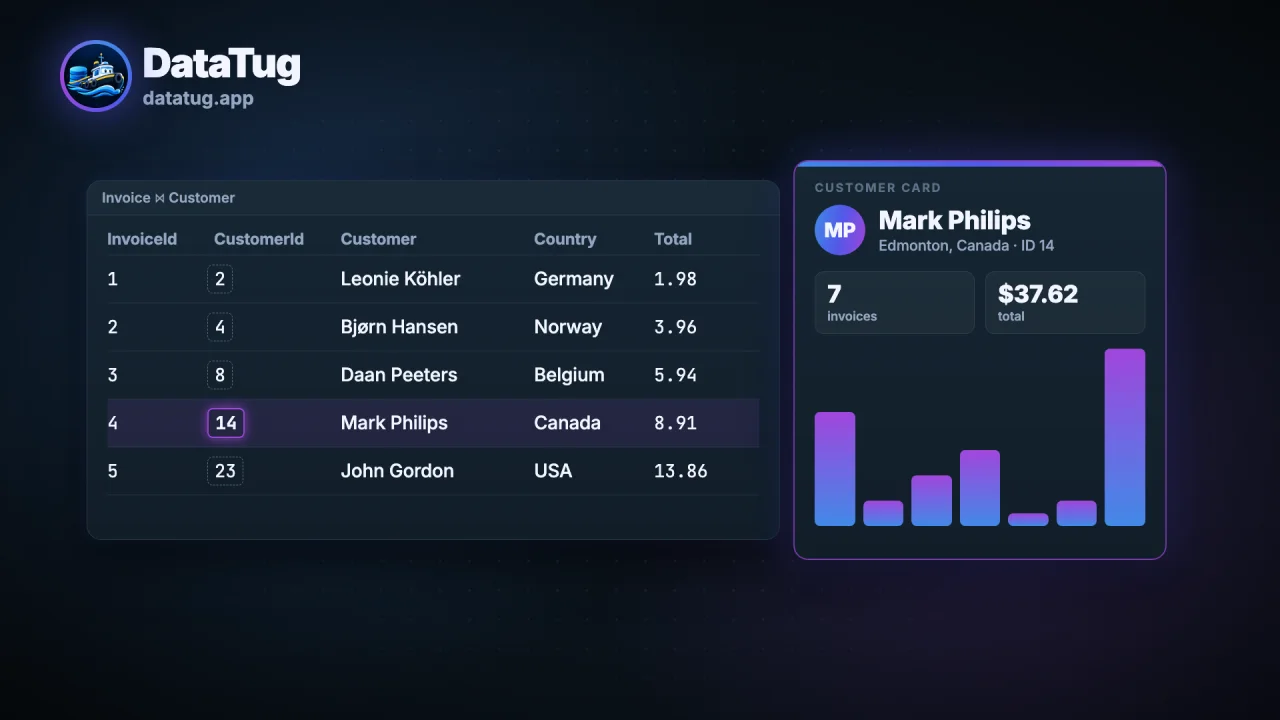 ▶ Watch DataTug in 30 seconds (0:30) Sources, browsing, column meanings, the suggested join, cards and Perimeter. Longer: the intro (1:01). |
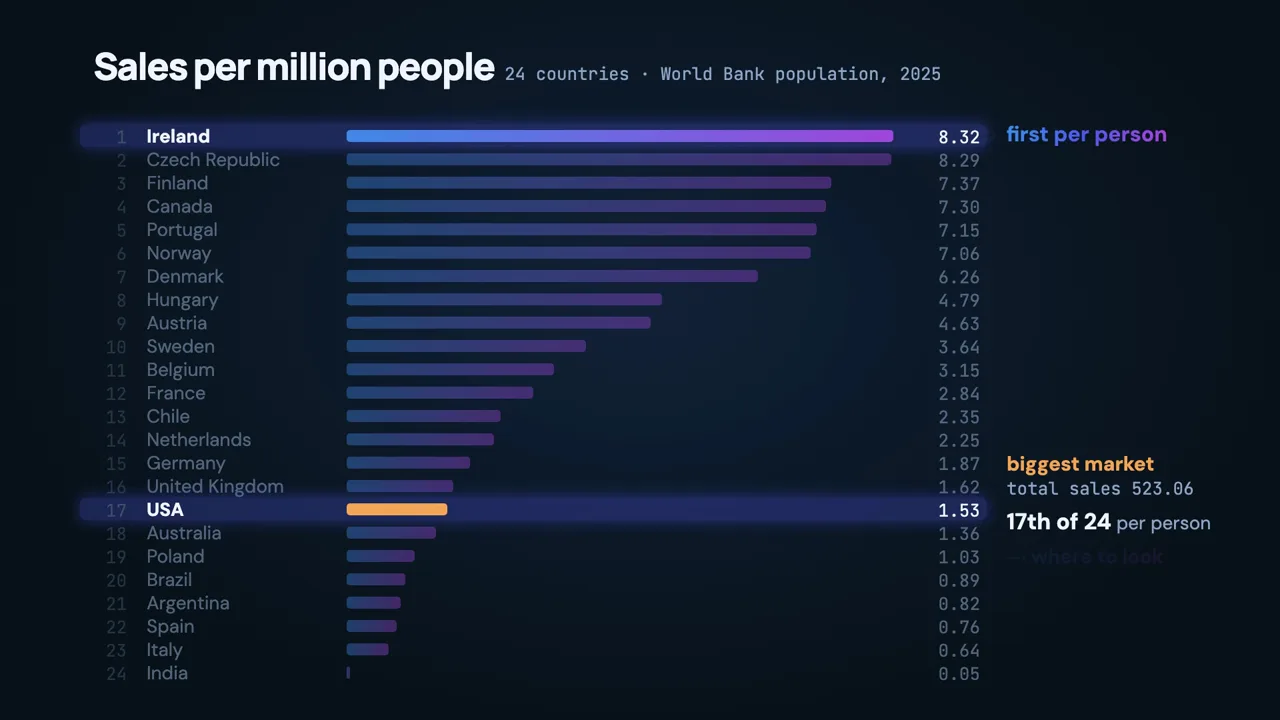 ▶ Where are we underselling? (1:30) The sales-per-capita query in this explainer runs with the DataTug CLI. |
Install the CLI (macOS and Linux with Homebrew; the other ways are in Installation):
brew install --cask datatug/tap/datatugThen scan a database, look at what was scanned, and run a query. Every command and every output block below is run by a test of this repository (quickstart_doc_test.go), so what you read here is what the CLI prints. The test runs the commands in the process of the test, and runs step 4 against a stand-in for the PostgreSQL server (see there).
1. Scan a database. The sample is a SQLite file made with the sqlite3 program (any SQLite file works). sqlite3
comes with macOS; on Linux install the package sqlite3 (apt install sqlite3, dnf install sqlite), or use a SQLite
file you have. The scan writes a project, a folder of plain files, and prints its progress on stderr and nothing on
stdout. The first time the CLI runs in a terminal it also prints a short notice about anonymous usage telemetry on stderr,
once; Telemetry says what is sent and how to turn it off.
$ sqlite3 shop.db "
CREATE TABLE Customer (CustomerId INTEGER PRIMARY KEY, FirstName TEXT NOT NULL, LastName TEXT);
CREATE TABLE Invoice (InvoiceId INTEGER PRIMARY KEY, CustomerId INTEGER, Total NUMERIC);
CREATE VIEW CustomerNames AS SELECT CustomerId, FirstName || ' ' || LastName AS FullName FROM Customer;
INSERT INTO Customer VALUES (1, 'Ada', 'Lovelace'), (2, 'Alan', 'Turing');
INSERT INTO Invoice VALUES (1, 1, 12.5), (2, 2, 40);
"
$ datatug scan -d shop-project -D sqlite3 --path shop.db --db shop --env local
2. Look at what was scanned. datatug show lists the project: each environment, each source with its driver, each
schema, each table and view with its columns, their types and their place in the primary key (pk; pk 2 is the
second column of a key of several). --format json prints the same as one JSON document.
$ datatug show -d shop-project
Project shop-project
Environment local
  Source shop (sqlite3)
    Schema main
      Table Customer
        CustomerId INTEGER pk
        FirstName TEXT
        LastName TEXT
      Table Invoice
        InvoiceId INTEGER pk
        CustomerId INTEGER
        Total NUMERIC
      View CustomerNames
        CustomerId INTEGER
        FullName -
3. Run a query. The query reads the database file; --no-policies runs it without access policies
(the line access: running without access policies goes to stderr).
$ datatug query run --db sqlite://./shop.db --from Customer --no-policies
$key  CustomerId  FirstName  LastName
1     1           Ada        Lovelace
2     2           Alan       Turing
4. Scan PostgreSQL the same way. Put the connection URL in an environment variable whose name starts with
DATATUG_, and pass the name of the variable with --driver postgres --dsn-env. The project stores the name of the
variable and never the URL: the host, the port, the user and the password stay in your environment. A PostgreSQL scan
reads every schema the role can use (the system schemas apart), and show lists each schema, with its views as views.
The output below is for a database with the two tables Customer and Invoice in the schema public; the output for your
database lists its own schemas and tables. The test of this README runs this step against a stand-in for the
server, and the scan of a real server is tested by the CI job "Journey (PostgreSQL )", on PostgreSQL 17 and 18.
$ export DATATUG_SHOP_URL='postgres://USER:PASSWORD@localhost:5432/shop'
$ datatug scan -d shop-pg-project --driver postgres --dsn-env DATATUG_SHOP_URL --db shop --env prod
$ datatug show -d shop-pg-project
Project shop-pg-project
Environment prod
  Source shop (postgres, URL in $DATATUG_SHOP_URL)
    Schema public
      Table Customer
        CustomerId int pk
        FirstName string
        LastName string
      Table Invoice
        InvoiceId int pk
        Total decimal
What else works, and what does not yet, is in Supported databases. To compare complete database contents across project environments, see Compare project databases.

Launch the interactive terminal UI to explore schemas, tables, and run queries with keyboard navigation:
datatug tuiFor details on widget layouts and keybindings, see TUI Screens.
The web app at datatug.app shows a command for the page you are on. Pass its address to --deep-link and the terminal UI opens on the matching project and screen:
datatug ui --deep-link https://datatug.app/project/github.com/acme/repo/some/dir/-/queriesA GitHub project is cloned to ~/datatug/github.com/<owner>/<repo> the first time and added to your projects; a project of the local datatug serve agent opens by its id in your settings. Queries, boards, databases and environments pages open their section of the project; other pages open the project itself. DataTug Cloud projects and projects stored in the browser can't be opened in the terminal yet: the Projects screen says so. See spec/features/cli/ui.
Run the local DataTug HTTP agent daemon to serve the Web UI, REST endpoints, and IDE integrations:
datatug serveBy default, datatug serve binds strictly to loopback (127.0.0.1) with origin protection. It is completely free and unrestricted under Apache License 2.0—no license key is ever required for individual local development.
The DataTug web UI can run entirely on your machine, served by the CLI, with no internet connection and no account.
datatug web-ui install ./datatug-web-ui-0.1.0.tar.gz   # from a release of github.com/datatug/web-ui; never touches the network
datatug serve --web-ui # prints http://datatug-app.localhost:8989/… and a 127.0.0.1 link- Get the archive (and its
.sha256) from datatug/web-ui releases on any connected machine and copy both across;installchecks the digest, every file and the DataTug release signature before anything is installed (a web UI you built yourself installs with--allow-unsigned). With internet,datatug web-ui install --latestdownloads the newest compatible release, and only then. - Installed versions live in
~/datatug/web-ui($DATATUG_WEB_UI_DIR).datatug web-ui list | use <version> | rollback | remove <version>manage them; a version this CLI cannot serve is listed with the reason and never served. - The page can reach only the local agent (Content-Security-Policy
connect-src 'self'), runs no telemetry, and the agent still enforces your access policies on every request. Cloud features (sign-in, cloud projects, hosted AI) are unavailable there unless you allow an origin with--ui-connect-src.
Details: spec/features/cli/web-ui.
DataTug provides a unified developer toolchain for multi-database exploration and automation:
- CLI & TUI (
.,apps/datatugapp): High-performance command-line utilities, TugQL query execution, and terminal user interface built with Bubble Tea. - Local HTTP Agent (
pkg/server,pkg/server/endpoints): Zero-config daemon providing local REST and WebSocket APIs for the DataTug Web UI and agent integrations. - Model Context Protocol (MCP): Native MCP server for AI coding assistants and agentic workflows.
- Storage Abstraction (
github.com/datatug/datatug-core/pkg/storage,ingitdb): Plain-file, Git-native database definitions, queries, and recordsets. - Watch Daemon (
pkg/watchdaemon,pkg/watch): Automated condition monitoring, baseline comparisons, and alert dispatches. - Commercial Licensing Engine (
commercial/licensing): Offline Ed25519-signed entitlements engine for organizational self-hosted deployments.
DataTug is distributed under an open-core licensing model (Model A):
- Community Core (Apache License 2.0): The CLI, TUI, local server (
datatug serve), schema modeling, TugQL queries, and MCP server are free and open source. See LICENSE and LICENSES/Apache-2.0.txt. - Commercial Edition (DataTug Commercial Terms): Centralized coordination, shared multi-runner orchestration, team execution stores, and carrier SMS notifications are governed by the DataTug Commercial Terms. See LICENSING.md and LICENSES/COMMERCIAL-TERMS.md.
| Capability | Community (Apache 2.0) | Commercial (Pro / Enterprise) |
|---|---|---|
CLI & TUI (datatug, datatug tui) |
✅ Unlimited Free | ✅ Included |
Local Server (datatug serve on localhost) |
✅ Unrestricted | ✅ Included |
| TugQL Query Engine & Schema Introspection | ✅ Included | ✅ Included |
| Model Context Protocol (MCP) Server | ✅ Included | ✅ Included |
| Central Watch Coordinator Daemon | Evaluation / Local | ✅ Licensed (central_watch_coordinator) |
| Distributed / Team Watch Runners | Evaluation / Local | ✅ Licensed (team_runners) |
| Shared Multi-User Execution Store | ❌ Commercial License | ✅ Licensed (shared_execution_store) |
| Centralized Team Audit Trail | ❌ Commercial License | ✅ Licensed (team_audit_trail) |
| SMS Telephony Alerts (Twilio) | ❌ Commercial License | ✅ Licensed (sms_notifications) |
- Go: 1.23+
- C Compiler: CGo is required for SQLite and DuckDB backends.
# Clone the repository
git clone https://github.com/datatug/datatug-cli.git
cd datatug-cli

# Build the CLI binary
go build -o bin/datatug .

# Verify installation
./bin/datatug --version
./bin/datatug --help# Fast targeted tests
go test -v ./commercial/licensing/...
go test -v ./pkg/watchdaemon/...
# Full test suite
go test ./...datatug db export (a shortcut for datatug db copy --to ingitdb://<folder>; see docs/db-copy.md) writes each supported DALgo source collection into a native inGitDB project, a local backup. --to may be a plain folder path; without it the folder is ./<database name>.ingitdb. --include, --exclude, --where, --limit, --dry-run, --json and --fail-on-warning work as for db copy. Cloud or remote backup is not this command (see db copy --to and the planned backup family). SQLite supplies a streaming row reader; other providers may materialize a collection in their query reader. For a local SQLite database:
datatug db export --from "sqlite://$PWD/shop.db" --to "ingitdb://$PWD/shop-ingitdb"

# Choose one records format for every exported table (default: json).
datatug db export --from "sqlite://$PWD/shop.db" --to "ingitdb://$PWD/shop-csv" --records-format csv
ingitdb validate --path ./shop-ingitdb
The destination directory must not exist. DataTug builds a complete project beside it and publishes the directory only after all collections succeed; a failed export leaves no completed destination. A source without a primary key receives export ordinal record IDs, marked as transport IDs rather than source keys. Those IDs are reproducible for a fixed source snapshot with deterministic provider row order; SQLite's source reader uses rowid order for keyless tables. Decimal values use string transport and binary values use base64; source schema, indexes, foreign-key declarations, and views are retained as descriptive metadata when the provider exposes them.
Source table names that inGitDB cannot use as collection IDs are encoded as dt_ followed by the source name's UTF-8 bytes in lowercase hex. Names beginning with the reserved dt_ prefix are encoded too, so the mapping is unambiguous. Ordinary names such as Album stay unchanged. .ingitdb/source-collections.json maps each native ID back to its exact source name; native foreign-key targets use those IDs while the original source definition retains its SQL names. Query an encoded table by its native ID shown in ingitdb list collections --path <export-directory>.
--records-format accepts json, jsonl, ingr, csv, and yaml (also yml), case-insensitively. JSON, INGR, and YAML use record-ID-keyed maps; JSONL and CSV carry a separate $ID transport key. CSV uses typed JSON-literal cells, preserving null versus empty text, exact integers, and quoted values.
The export uses DataTug's DALgo source URL dispatcher, including local sqlite://, native ingitdb://, OpenVaultDB HTTP URLs, and env:NAME for a URL stored in an environment variable. The current native root export requires collections without namespaces, databases, or parent scopes; it reports a clear error for a source it cannot map. Provider capabilities differ; an unreadable collection or value that cannot be represented fails the export explicitly. Source constraint checking, when available, is a preflight check. Native inGitDB does not execute SQL foreign-key actions or other SQL constraints on later writes, and a mutable source can change after the preflight check. For a consistent snapshot, hold a source-side snapshot or read lock during export. Re-exporting an inGitDB project through a provider without physical storage-class metadata retains logical values and source schema but marks constraints unverified; it cannot claim the original SQLite INTEGER-versus-REAL cell classes. The inGitDB DALgo reader does not currently load source-collections.json, so a second native-to-native export treats encoded collection IDs as its source names and does not preserve the first source-name mapping.
We build with our own tooling:
- SpecScore — specify requirements as
SpecScore.mdartifacts - SpecStudio — author & manage specs across their lifecycle
- inGitDB — store structured data in Git where applicable
- DALgo — data access layer for Go
- cover100.dev — drive toward 100% test coverage
- DataTug — query & explore data


Help wanted to get test coverage to 100%.
(p=$(mktemp) && trap 'rm -f "$p"' EXIT && curl -fsSL https://datatug.app/get-cli -o "$p" && sh "$p")Environment overrides: DATATUG_VERSION (default: latest release), DATATUG_INSTALL_DIR (default: ~/.local/bin).
When the install directory is not on PATH, the installer appends one line that adds it to your shell's startup file (~/.zshrc, ~/.bashrc, ~/.bash_profile on macOS, fish's config.fish, otherwise ~/.profile) and prints the file, line number and line it wrote. DATATUG_MODIFY_PATH=0 skips that edit and prints the line to add yourself. scripts/install.sh is a copy of the published script, whose source is apps/app/public/install/get-cli in datatug/websites.
$p=Join-Path $env:TEMP ("datatug-"+[guid]::NewGuid()+".ps1"); try { irm https://datatug.app/get-cli.ps1 -OutFile $p -EA Stop; & $p } finally { Remove-Item $p -EA SilentlyContinue }Environment overrides: DATATUG_VERSION, DATATUG_INSTALL_DIR (default: %LOCALAPPDATA%\DataTug\bin). Current Windows releases support amd64.
datatug disk
datatug uninstall --dry-run
datatug uninstall --web-ui --dry-run
datatug uninstall --full --skills codex --dry-run
datatug demo reset --dry-run
Bare uninstall previews the CLI only. Use --web-ui for downloaded browser assets, --skills codex or --skills claude for one agent's user plugin, or --full for the CLI and web UI together. Add --skills explicitly to include a plugin in full removal. Stop a local server using the selected web UI files before removing them. After reviewing the plan, replace --dry-run with --apply. The standalone Unix executable can remove itself. Other installs report the owning package manager or require a manual step, including a running Windows executable. Projects, credentials, shell settings and marketplaces stay in place.
The web UI preview lists every path in a verified signed release. Unsigned builds, modified files, and unrecognized paths are left in place. If deletion returns an error after the store has been detached, DataTug reports the private directory containing its remaining files.
demo reset separately moves the default Perimeter demo into a numbered sibling backup and removes its matching registration. Run datatug demo install again to create a fresh copy. The backup keeps the demo audit and any edits, so it does not reclaim disk space.
Add --format json for machine-readable paths, file and directory counts, and logical bytes. Disk usage includes the running CLI, downloaded web UI, settings, local registered projects, and the rest of the DataTug data directory. Symlink targets inside a directory are excluded. Filesystem allocation and plugin-manager removals may differ from the measured total.
https://datatug.app/run-cli runs the CLI with the arguments you give it, so the command the web app shows works on a machine without DataTug:
curl -fsSL https://datatug.app/run-cli | sh -s -- ui --deep-link <address>& ([scriptblock]::Create((irm https://datatug.app/run-cli.ps1))) ui --deep-link '<address>'macOS / Linux — Homebrew (tap)
brew install --cask datatug/tap/datatugEvery release updates the Homebrew cask a few minutes after it is published, so Homebrew carries the same version as the direct installers (curl and PowerShell). brew list --cask --versions datatug shows the version installed.
The direct installers and Homebrew package do not require Go. See the full installation guide or the official AI-agent instructions.
datatug self-update
datatug self-update --check  # report whether a newer release exists, without applying it
Homebrew installs run brew update && brew upgrade --yes --cask -- datatug; direct installs from curl or PowerShell download and checksum-verify the latest release and swap the binary in place. See spec/features/cli/self-update.
datatug install                # list ingitdb, ovdb and specscore, with install status
datatug install ovdb           # show details and install it the same way datatug itself was installed
datatug install ovdb --dry-run # report the planned action without downloading or writing anything
datatug upgrade                # report current/latest/verdict for every installed fleet CLI plus datatug itself
datatug upgrade --all          # upgrade every installed fleet CLI plus datatug itself, after one confirmation
ingitdb validates and edits the inGitDB databases DataTug reads; ovdb
runs a user-owned OpenVaultDB server DataTug can query as a catalog;
specscore lints DataTug's own specifications. datatug upgrade is the
fleet-wide counterpart to self-update: datatug self-update is exactly
datatug upgrade datatug, built from the same catalog configuration, so
the two never disagree. See
spec/features/cli/install.
This is the direction of the product, not a list of what the released CLI does: what works today is in the Quick start and in Supported databases.
- Explore data everywhere — SQL databases, cloud data sources, logs, and APIs (HTTP / REST)
- CLI-first workflows with a Web UI — dashboards, charts, and shared views
- Create parametrised queries and query sets for repeatable troubleshooting and investigation scenarios
- Automatically navigate related data across tables, views, APIs, and different data sources
- Build data pipelines to transform, combine, and enrich data
- Document schemas and metadata with a built-in wiki
- Version everything with Git — queries, dashboards, pipelines, and settings stored as readable project files
- Choose where your project lives:
- Local directory (fully offline)
- GitHub repository
- DataTug Cloud
DataTug turns scattered data into a connected, navigable workspace — combining the speed of the CLI with the clarity of a Web UI for exploration, troubleshooting, and collaboration.
datatug chat normally shows the AI model the definitions of all of a project's tables on every turn. Table narrowing
decides, before each turn, which tables the model needs and shows it only those. Your own project rules are always on;
the decision model is off until you turn it on.
What it does. Before the model is asked, the chat picks the tables for the question: first your project rules, then
(if you turned it on) a decision model. Tables judged only possibly relevant stay in; so do the tables on the
foreign-key path between selected tables (when the source's foreign keys are known) and, for a follow-up such as "and by
genre?", the tables the previous turn used. The model is told the names of the tables that were left out and can read
up to two of them per turn with the read-only describe_relation tool. The chat prints one line naming the tables the
model was given, and the decision (engine, model, scores, tables before and after) is stored with the chat session.
What it costs and saves, honestly. Narrowing removes schema bytes from every request, but the model's request also
holds fixed instructions and tool definitions, and a table the model was not shown can cost a describe_relation
round trip, which re-sends the whole request. Measured on the 11-table Chinook sample, summed over every model call of
a turn:
| model calls | input bytes | vs no narrowing | |
|---|---|---|---|
| no narrowing | 2 | 22,059 | |
| narrowed to 3 of 11 tables | 2 | 21,369 | -3.1% |
| narrowed, and the model reads 1 omitted table | 3 | 32,785 | +48.6% |
The schema context alone goes from 1,829 to 1,111 bytes (-39%, the note naming the omitted tables included). The saving grows with the schema (hundreds of tables, wide tables) and is small on a schema as small as Chinook's. Narrowing is applied only when the narrowed context is at least 25% smaller than the full one; otherwise the full schema is kept. It is not a guarantee of a better answer: a wrong narrowing is possible, which is why the omitted tables are named and readable.
When it cannot decide, the chat sends the full schema, exactly as it did without narrowing: the decision model is off, slow (more than 1.5 s by default), failing, refused (allowance spent, wrong endpoint), unsure, incomplete, the schema is larger than 255 tables, or the narrowing would save less than 25%. After a failure the decision model is not asked again for five minutes.
Project rules (local, always on). <project>/ai/table-rules.yaml (the format is provisional, until the decision
layer is specified):
decision: auto            # a REQUEST for the decision model; see below. disabled (default) | auto | cloud
rules:
  - phrase: Which countries buy the most music?   # exact question; case, spacing, trailing ?!. ignored
    tables: [Invoice, Customer]                   # exact table names
A matching rule decides on its own and nothing leaves your machine. A rule that names a table the schema does not have, or has an unknown key, is reported as a warning when the chat starts and never fires. A malformed file, a symbolic link, a directory in its place or a file over 64 KiB is ignored with a warning; the chat starts anyway.
The decision model (off until you turn it on). With --model cloud the chat can ask the DataTug AI cloud, which
relays to TypeSafe AI's Jev decision model (an external model, not an LLM: it scores each table's relevance). When
it is on, this is sent to the DataTug cloud and from there to TypeSafe AI:
- your question, and up to the three earlier questions of the session that were asked while it was on (verbatim);
- every table name, with its column names (no column types, no rows, no values);
- the usual identifiers the cloud client already sends: an interaction id, your installation id and client version, and your sign-in token, which authenticates you to the DataTug cloud.
Only you can turn it on, so that opening a cloned repository never starts forwarding your questions:
DATATUG_AI_DECISION_PROVIDER=auto(orcloud, the same plus a warning when the chat is not using--model cloud) turns it on for that session.DATATUG_AI_DECISION_PROVIDER=disabledalways wins over everything below.datatug chat --cloud-decision allowrecords your consent for this project (identified by its directory, so a copy elsewhere does not inherit it, and a project you move or rename needs consent again) indatatug/decision-consent.jsonin your user config directory, outside the project.--cloud-decision refuserecords a refusal;--cloud-decision forgetremoves the record.- A project's own
decision: auto|cloudonly requests it. Without your consent it is ignored, and the chat prints one line at start saying so, what would be sent and to whom, and the commands above.
Whenever it is on, the chat shows one line at start, as a system line at the top of the chat (the terminal UI hides
anything printed before it starts) and on stderr for non-interactive runs, naming where the setting came from, what is sent
to whom, and how to turn it off. Rule and configuration warnings appear the same way. These lines are not messages: they
are not stored in the session and never sent to the model. DATATUG_AI_DECISION_TIMEOUT (a Go duration, default 1500ms) sets how long it may take per turn. It is off
by default pending a decision on how TypeSafe AI may handle this data.
Telemetry for a decision carries counts and the engine and model ids only (for example narrowed:before=11:after=3),
never table names or question text, and is sent only when a decision was actually made.
This is an agent service for https://datatug.app that you can run on your local machine, or some server to allow DataTug app to scan databases & execute SQL requests.
It runs on your machine under your user account. The connection URL of a PostgreSQL source stays in an environment variable of yours, and a project never holds it.
AI clients can use datatug mcp over stdio to discover local
projects and schemas and run saved SQL or TugQL through that agent's read-only session.
No, we won't.
DataTug is free for personal use and built on open standards and protocols (including TugQL, OpenVaultDB, and ModelSpec). The CLI runs locally and we do not look into your data.
The CLI does send a small amount of anonymous usage telemetry, which you can switch off: see Telemetry.
What is sent. The CLI sends anonymous usage events and crash reports to PostHog
(eu.i.posthog.com), through pkg/dtlog, the only code in this repository that can send them. We use them
to learn how often the CLI is run, which screens are opened and where it crashes, so we can fix what people hit. With telemetry on
the CLI also fetches its PostHog project key from raw.githubusercontent.com, once a day when that succeeds (it is retried on each run until it does): that request carries no
data of yours (GitHub sees the IP address it comes from, as any web server does), and it is not made when telemetry is off.
| Event | When | Fields it carries |
|---|---|---|
DataTug CLI started |
a command starts | the common fields below |
DataTug CLI exited |
a command ends | the common fields below |
Screen opened |
a screen of the terminal UI opens | the common fields, $app_name (DataTug), $app_version, $screen_id and $screen_name (fixed labels of DataTug's own screens, such as viewers/sqlite and SQLite Viewer) |
$exception (crash report) |
the CLI crashes with a panic | distinct_id, the SDK and system fields below, and one exception: its type (panic), its value (the Go type of the panic value, such as string or *errors.errorString; for a crash of the Go runtime itself, such as an index out of range, its message, which names numbers and types only) and its stack: function names, source file names (no directory), line numbers and code addresses; and $debug_images: the type, build id, load address, link address, size and architecture of the executable (not its path) |
The common fields: uuid (a random id of the event), distinct_id (a random id of this install, kept in
~/datatug/.posthog.yaml), timestamp, the
session ($session_id, $session_start_time, $session_duration), and what the PostHog Go SDK adds: $lib,
$lib_version, $os, $os_version, $os_distro, $go_version, $geoip_disable and $is_server. $geoip_disable asks
PostHog not to look up your location; as for any web request, PostHog's server still receives the IP address the request
comes from.
What is not sent. No database content, no query text, no project or database name, no path, no host, no user name, no
command-line argument and no credential. The text of a panic is not sent either, because it can hold a path or a host: it
goes to stderr and to the local log only. A test builds each event as pkg/dtlog hands it to the PostHog client and fails
when its fields change, so this list cannot drift from the code, and another test fails when any other package imports the
PostHog client. The notice is checked by tests for the claims it makes about the fields (such as which event carries the
DataTug version), and by a reader against this list when either changes.
The first run. The first time the CLI runs with telemetry on in a terminal (stderr is a terminal) it prints a notice
on stderr (at most six lines) saying the above in brief, and nothing is sent on that run. Events start with the next run.
The notice is printed once per user: the CLI records that it was shown in the file ~/datatug/.telemetry-notice-shown
(delete it to see the notice again). If that file cannot be written the notice is printed again next time, and the run
does not fail. A run whose stderr is not a terminal (a script, a service, shell completion with 2>/dev/null) tells
nobody, so it prints nothing, writes no marker and sends nothing: the notice waits for the first run in a terminal. The
same holds when the home folder cannot be resolved (a service without a home): nothing is created and nothing is sent.
Turn it off. Telemetry is on only when DATATUG_TELEMETRY is empty or one of 1, true, on, yes; any other value
turns it off, so a typo never leaves you measured. Any one of these turns telemetry off completely: no notice, no client,
no request, no file:
DATATUG_TELEMETRY=0     # 0, false, off, no, or any value other than 1, true, on, yes
DO_NOT_TRACK=1          # any value but empty or 0 (https://consoledonottrack.com)
CI=true                 # any value but empty or false: set by most CI systems
A variable set in one terminal is gone in the next. To turn telemetry off for good, add export DATATUG_TELEMETRY=0 to
your shell profile (~/.zshrc, ~/.bashrc), or on Windows run setx DATATUG_TELEMETRY 0 once. datatug --help names the
variable too. datatug version --json never sends telemetry, whatever you set.
Chat with the DataTug cloud AI. datatug chat --model cloud is your choice to use the DataTug cloud AI service: your
questions go to it to be answered, whatever the switch says, because that is what the command does. It also sends a
metadata report of each turn (the length of your message in characters and words, its status and outcome, the names of the
actions that ran, the conversation id, a random id of the turn, the client type and feature labels, and your install id, OS, CPU architecture and DataTug version; not the text of your question and not
your rows). That report is usage telemetry and follows the same switch: with DATATUG_TELEMETRY, DO_NOT_TRACK or CI
turning telemetry off, or on the first run, it is not sent. Its install id is a different random id from the one above,
kept in datatug/installation_id in your user configuration folder (os.UserConfigDir). Chat with your own AI profile
reports nowhere.
When DataTug agent scans or compare your database it stores meta information in a datatug project as set of simple to understand & easy to compare JSON files.
We recommend to check-in the project to some source versioning control system like GIT.
You can run commands for different projects by passing the path to the project folder. E.g.:
> datatug show -d ~/my-datatug-projects/DemoProject
A project can be registered under a short name with datatug projects add: the paths to the registered projects, and
their names, are stored in ~/.datatug.yaml in your user's home directory. Then a project is addressed by its name:
> datatug show -p DemoProject
If the current directory is a DataTug project folder you don't need to specify project name or path.
> datatug show
Use one of the supported methods in Installation. None requires Go.
Then verify the installed CLI:
> datatug --help
Start with the Quick start. datatug --help lists every command, and datatug serve runs the agent that
the web app talks to (see spec/features/cli/serve).
| Database | Scan (datatug scan) |
Query (datatug query run) |
|---|---|---|
| SQLite | supported: tables and views, columns, primary keys, foreign keys and indexes | supported, read-only: --db sqlite://... with TugQL (-f, --from) or SQL (--sql), and saved TugQL and SQL queries |
| PostgreSQL | supported: every schema the role can use, tables and views, columns with their defaults, primary keys, foreign keys and indexes; the connection URL stays in an environment variable | supported, read-only: --db env:NAME with TugQL (-f, --from) or SQL (--sql, one SELECT or WITH query), and saved TugQL and SQL queries |
| MySQL | supported: the tables of the database of the URL, columns, primary keys, foreign keys and indexes; the connection URL stays in an environment variable | supported, read-only: --db env:NAME with TugQL (-f, --from) or SQL (--sql, one SELECT or WITH query), and saved TugQL and SQL queries |
| Oracle | supported: the tables and views of the session's schema, columns, primary keys, foreign keys and indexes; the connection URL stays in an environment variable | supported, read-only: --db env:NAME with TugQL (-f, --from) or SQL (--sql, one SELECT or WITH query), and saved TugQL and SQL queries |
| SQL Server | supported: the tables and views of the login's default schema, columns, primary keys, foreign keys and indexes; the connection URL stays in an environment variable | supported, read-only: --db env:NAME with TugQL (-f, --from) or SQL (--sql, one SELECT or WITH query), and saved TugQL and SQL queries |
| inGitDB | not supported yet | supported: --db ingitdb://./path-to-the-database |
| BigQuery | not supported yet | supported, read-only, through its own command, datatug query bigquery (preview, then run with the approved digest): one table described by a source profile, chosen columns, simple conditions and order, a limit, and a --maximum-bytes-billed cap; you sign in with your Google account (--auth adc or --auth google). See pkg/bigqueryread |
| REST APIs | not applicable | supported, read-only: --db http://<project-dir> reads the project's HTTP queries (queries/**/*.query.json of type HTTP with a .query.http URL template) as collections, calling the API live and falling back to the query's recorded snapshot in fixtures/http/ when the call fails (the source: line says which); a parameter of the URL is set by a where condition on its column |
| OpenVaultDB | not supported yet | supported, read-only: --db openvaultdb://./connection.json (a connection descriptor with the server URL, database ID and the name of the environment variable that holds the token) with TugQL (-f, --from); OpenVaultDB enforces its own access policies. See Layered ACL publication |
| MongoDB | not supported yet | supported, read-only: --db env:NAME with mongodb:// or mongodb+srv://, TugQL (-f, --from), filtering, projection, ordering and bounded results; see Query MongoDB |
| Redis | not supported yet | supported, read-only, through datatug query redis --db env:REDIS_URL -- GET key: native string/hash reads and metadata; Redis ACLs control access. See Query Redis keys. SQL, TugQL and saved queries are unavailable |
| Firestore | not supported yet | supported, read-only: --db firestore://PROJECT/DATABASE with TugQL (-f, --from), filtering, projection, ordering and optional limits; see Query Firestore |
A database that is not in this table is not supported by this release. We are open for pull requests.
PostgreSQL, via dalgo2postgres. datatug scan -D postgres --dsn-env DATATUG_SHOP_PG_URL --db shop --env local reads the connection URL from the environment variable (it is never written to
the project) and saves every schema the role can use, the system schemas apart: tables, views and materialized views
(as views), columns with their defaults (the text of the SQL expression), primary keys, foreign keys and indexes, a
folder for each schema.
MySQL, Oracle and SQL Server, via dalgo2mysql,
dalgo2oracle and dalgo2mssql, work the
same way. Put the connection URL in an environment variable whose name starts with DATATUG_ and name the variable:
export DATATUG_SHOP_MY_URL='mysql://user:password@host:3306/shop'
datatug scan -D mysql --dsn-env DATATUG_SHOP_MY_URL --db shop --env local

export DATATUG_HR_ORA_URL='oracle://user:password@host:1521/FREEPDB1'
datatug scan -D oracle --dsn-env DATATUG_HR_ORA_URL --db hr --env local

export DATATUG_SALES_MS_URL='sqlserver://user:password@host:1433/sales'
datatug scan -D sqlserver --dsn-env DATATUG_SALES_MS_URL --db sales --env local

datatug query run --db env:DATATUG_SHOP_MY_URL -f top-customers.tugql
datatug query run --db env:DATATUG_SHOP_MY_URL --sql 'SELECT id, name FROM customer ORDER BY id'
One TugQL text query can also join tables of several databases: it declares them in a databases ( block and binds
each alias to a project source (datatug://<project>/<db>) or with --db <alias>=<url>. Each source is a separate
secured read. See cross-database queries.
Every scan, of these servers, PostgreSQL and SQLite alike, saves the foreign keys of the database's tables in
dbmodels/<db>/<db>.refs.json and their indexes in dbmodels/<db>/<db>.indexes.json (an index on an expression is
left out), beside the columns files of the tables.
The project holds the name of the variable (connections/<env>/<db>.json) and never the URL or any part of it: not the
host, the port, the user, the password or the database. The tables are saved under the schema default, whatever the
real schema is called. The URL may carry only a few query parameters (MySQL: tls, timeout; Oracle: SSL,
SSL VERIFY, TIMEOUT, CONNECTION TIMEOUT, WALLET; SQL Server: encrypt, TrustServerCertificate,
connection timeout); any other is refused.
Reads are read-only, in two layers. First, structured queries compile to a SELECT, and a saved SQL query must be
one SELECT or WITH query: DataTug refuses, before it reaches the server, a text with a second statement or with a
word that writes, runs code or ends a transaction (UPDATE, INTO, COMMIT, EXEC, SET, FUNCTION, ... outside
string literals, quoted names and comments). Second, the connection: a MySQL session has transaction_read_only on,
on Oracle every read runs in a READ ONLY transaction, and SQL Server, which has no read-only session, runs every read
in a transaction that DataTug always rolls back. Neither layer stops a function or a procedure already on the server
that writes when a query calls it (an Oracle function with an autonomous transaction commits its own writes), so give
DataTug a login that can only read: on PostgreSQL a role with SELECT only, on MySQL SELECT and no FILE
privilege, on SQL Server db_datareader and VIEW DEFINITION, on Oracle CREATE SESSION and SELECT on the tables.
PostgreSQL is read the same two ways: the text is checked as above (a dollar-quoted string, a backslash in a string, a
character that is not ASCII outside a string and set_config, quoted or not, are refused too), the session has
default_transaction_read_only on, and SQL text runs in a read-only transaction that DataTug always rolls back, so a
setting a called function changes for the session is undone with it.
Reads of these servers through access policies are not available yet: when policies are loaded, run the query with
--no-policies. SQL text (--sql and saved SQL queries) is never read through the row and column rules of policies.
Read README-dev.md for details on how to setup, debug, and contribute; the terminal UI architecture (shell, widgets, grid, navtest) is summarised there and explained in tui-screens.md.
SQLite samples to scan and query:
- Bubble Tea - Terminal UI framework (The Elm Architecture) with Lip Gloss styling; shared widgets live in
tuigoff - DALgo - Database Abstraction Layer for Go
- https://gihub.com/strongo/validation - helpers for requests & models validations
We welcome contributions to DataTug! Please read our contributing guidelines for more information on how to contribute to the project.
Query an embedded DuckDB database or Parquet files using the normal SQL command:
datatug query run --db duckdb:///data/analytics.duckdb --sql 'SELECT * FROM events LIMIT 10' --no-policies
datatug query run --db duckdb://:memory: --sql "SELECT * FROM read_parquet('/data/events.parquet') LIMIT 10" --no-policies
DuckDB native SQL accepts a single query and runs in a read-only transaction.
DuckDB queries can read external files and URLs, so native SQL requires an
unrestricted session (--no-policies). All official release binaries include DuckDB. Building DuckDB support from
source requires cgo and a C/C++ toolchain; custom CGO_ENABLED=0 builds retain
other backends and report an explicit error when DuckDB is requested.
Apache License