


Open-source Python framework to build, simulate, train and deploy AI robots, with open hardware that runs UMI policies on any arm.

Point, don't prompt: click an object (SAM 2) and a spot (TAPNext), and two UMI policies pick and place it. No teleoperation.
Website · Docs · Video · Why I built it
Solarian is an open-source robotics framework designed to build, simulate, teleoperate, train, and deploy robots. From hardware to AI control in one Python stack.
Solarian brings the developer experience of a modern Python library to robotics, and it is built around low level control using learned policies: ACT, diffusion policies, rather than hand-programmed logic alone. Plus high level control using an agentic harness around VLMs. At the structural level, a robot is a Python class made of modules (reusable components such as arms, grippers, cameras, etc), each module a class made of sensors and actuators. The same project runs in simulation and on hardware, and recording, training, and serving a policy all happen inside the framework.
The goal is to have modularized robots, that can be reused, not only their structure, but their skills. Solarian adopts UMI as its main path to learning manipulation: demonstrations come from a handheld gripper, and policies describe the gripper's motion rather than one arm's joints, so a trained skill can run on another compatible arm without new data. Open hardware and models live alongside the code, as building blocks for people and AI agents alike. Read more in Why I created Solarian.
- Real-time modules. A robot is built from modules such as an arm, a gripper, or a camera. Each runs in its own process at its own rate, so a 500 Hz arm never waits on a 30 Hz camera.
- Kinematics built in. Command the end effector, and the module solves inverse kinematics every tick. Command the joints, and the module solves forward kinematics too.
- AI Agentic Controller. Agentic control for any robot: a harness around any vision-language model (Anthropic, OpenAI, or any OpenAI-compatible server) takes a high-level task from chat, plans it, and carries it out by calling your physical skills as tools, while a fast monitor model watches each one through the cameras.
- Simulation built in.
solarian run-robot --simruns the same robot class and YAML in MuJoCo instead of on hardware. - Plugins. Solarian is extensible by design: actuators and sensors (servos, cameras, etc), modules (arms, grippers, etc), skills (low level learned policies and heuristics) install as plugins, config included.
solarian create-pluginstarts your own. - Recording, datasets, and training. Record every camera and signal at its native rate, curate episodes, train diffusion, ACT, or UMI policies, and serve them back to the robot.
- Typed observations and actions and Hydra configuration. Pydantic schemas bound to your modules, and composable YAML you can override from the command line.
pip install solarian
pip install "solarian[all]"   # optional: AI, agentic controller, and simulation extras
Visit our Documentation to get started with Solarian.
Visit the Tutorials to learn Solarian by building a demo robot arm project.
If you are an AI coding agent asked to build something with Solarian, start from the CLI rather than writing files by hand:
pip install solarian
solarian create-project my_robot              # a new robot project
solarian create-plugin <type> <name>          # a new plugin: actuator, sensor, module, robot, command, policy or op
solarian docs list                            # the docs for the installed version, offline
create-project and create-plugin write an AGENTS.md and agent skills into what they create. Read AGENTS.md first. The docs are also at solarian.dev/llms.txt, and every page has a markdown version at https://solarian.dev/docs/<page>.md. To have your agent find Solarian in any folder, run solarian agent install once. See Using Solarian with coding agents.
This is a trimmed version of arm1, a Solarian Arm 1 with a UMI-style gripper and a wrist camera. A robot is a class whose attributes are its modules. The scene is what --sim uses to build the MuJoCo world.
from solarian.core import Robot
from solarian.sim import CameraMount, ModuleAttachment, SceneConfig
from solarian_arm1 import ARM_MJCF_PATH
from solarian_arm1.arm import Arm1Module
from solarian_picamera import PiCameraModule
from solarian_gripper1 import MJCF_FEETECH_PATH as GRIPPER_MJCF
from solarian_gripper1.gripper_feetech import Gripper1FeetechModule


class Arm1Robot(Robot):
    right_arm = Arm1Module(ik_tcp=Gripper1FeetechModule.tcp_from_flange)
    right_gripper = Gripper1FeetechModule()
    right_wrist_camera = PiCameraModule()

    scene = SceneConfig(
        world_mjcf="assets/sim_scene.xml",
        attachments=[
            ModuleAttachment(module="right_arm", mjcf=ARM_MJCF_PATH, parent_body="world", prefix="right/"),
            ModuleAttachment(
                module="right_gripper",
                mjcf=GRIPPER_MJCF,
                parent_site="right/flange",
                child_site="flange",
                prefix="right_gripper/",
            ),
        ],
        # A MuJoCo camera looks down -Z; the exported camera frame's +Z points away from the gripper.
        cameras=[CameraMount(name="right_wrist_cam", site="right_gripper/camera", quat=[0.0, 1.0, 0.0, 0.0], fovy=160.0)],
    )
The controller decides what the robot does. Here it teleoperates the arm from the keyboard, names its tools (a skill plus the params it binds), binds keys to them, and marks the ones the agentic controller may call:
from solarian.core import Controller
from solarian.core.event import Event, EventType, event_handler
from solarian.core.skill import Tool
from solarian_move import MoveSkill
from solarian_umi import UMISkill
from solarian_gripper1.aperture import APERTURE_CLOSED_MM, APERTURE_OPEN_MM

from arm1.skills import CartesianTeleopSkill

ARM = {"arm": "right_arm", "gripper": "right_gripper"}
TELEOP = {**ARM, "frame": "ee", "gripper_min_mm": APERTURE_CLOSED_MM, "gripper_max_mm": APERTURE_OPEN_MM}


class Arm1Controller(Controller):
    tools = {
        "teleop": Tool(CartesianTeleopSkill, TELEOP),
        "home": Tool(MoveSkill, {**ARM, "pose": "home"}),
        "move_to_pose": Tool(MoveSkill, ARM, agent_enabled=True),
        "pick_object": Tool(UMISkill, {"config": "pick_object.yaml"}, agent_enabled=True),
    }

    def on_start(self):
        self.start_tool("teleop")

    @event_handler(EventType.KEY_DOWN)
    def start_bound_skill(self, event: Event) -> None:
        match event.data.get("key"):
            case "0":
                self.start_tool("home")
            case "4":
                self.start_tool("pick_object")
Run the relay server, the robot, and the controller from the project directory. Each can run on a different machine; --deployment picks the profile in conf/deployment/ that says where.
solarian run-server
solarian run-robot --sim     # drop --sim to drive the real arm
solarian run-controller
The simulated arm going to its ground pose, jogged from the keyboard, then back home:
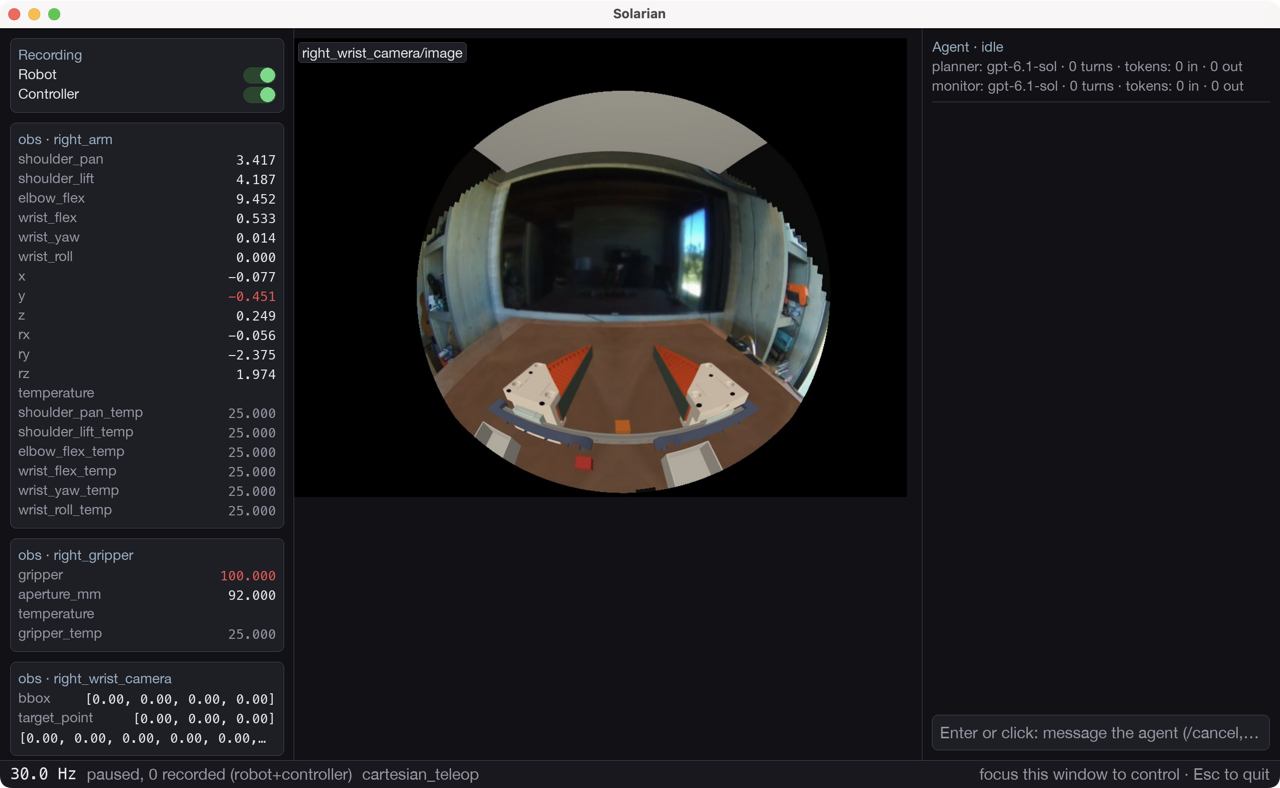
The controller window shows the live observations, the wrist camera, and the agentic controller's chat:
To chat with other community members, you can join the Solarian Discord server.
Solarian is early, and contributions are welcome. A few guidelines to start with:
-
For anything larger than a small fix, open an issue or ask on Discord before writing the code, so we can agree on the approach.
-
To work on Solarian itself, install it from source and run the tests:
git clone https://github.com/solarian-dev/solarian.git
cd solarian
pip install -e ".[all]"
pytest tests/
On Apple Silicon that install builds
atomicsfrom source, andxformerswith theaiextra (.[all]includes it). It needs git and a C compiler. -
New hardware support and skills usually belong in a plugin rather than in the core. Start one with
solarian create-plugin, and list it in the Plugin Directory.
A CONTRIBUTING.md and a code of conduct are coming.
Solarian is licensed under the Apache License 2.0. Copyright 2026 PrimaryKey Inc. Vendored third-party code keeps its own license; see NOTICE. Model weights are downloaded separately and keep their upstream licenses.
Solarian and the Solarian logo are trademarks of PrimaryKey Inc. See the trademark policy.